Background: Truncated Answers Are Usually Not a Model’s “Inability to Write,” but a Lack of Output Governance
After launching a large language model application, you often encounter an awkward problem: the API returns a 200 status, the frontend displays content, but the user sees a truncated answer.
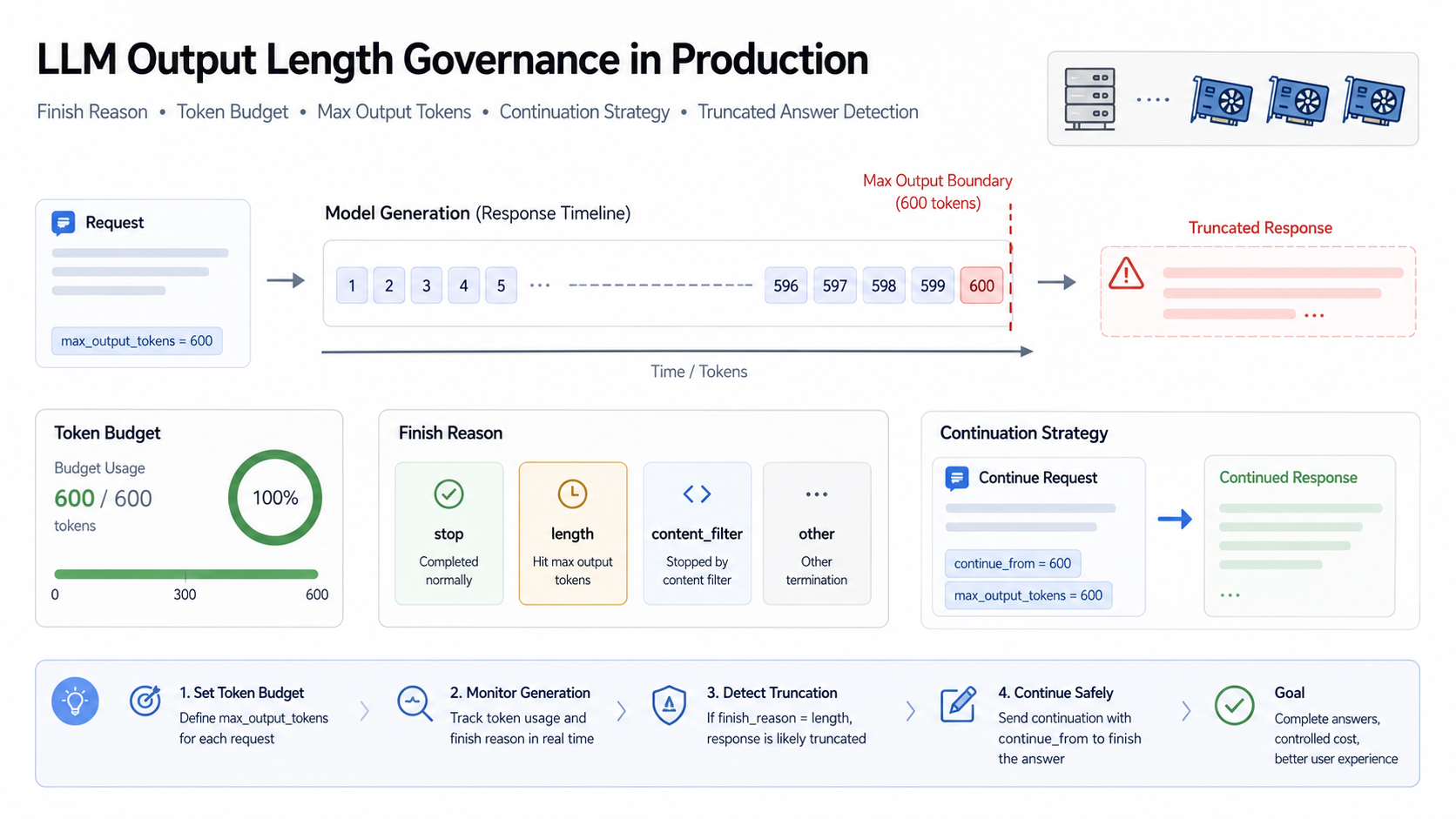
Common manifestations include: a report ending abruptly in the third section, unclosed code blocks, a list stopping at item 7, a Markdown table missing its last few rows, a customer service reply ending before a conclusion, or an agent plan only half-executed but marked as complete. For users, this isn’t “average model quality”—it’s product unreliability.
The root cause of these issues is usually not a single max_tokens value being too small. The real problem is that the system doesn’t treat output length as a production resource to be governed:
- No budget set per task type
- No reading and interpreting of
finish_reason / stop_reason / finishReason - No distinction between natural completion, length truncation, safety interception, tool calls, and abnormal termination
- No design for controllable continuation strategies
OpenAI’s documentation states that different APIs use max_output_tokens or max_completion_tokens to control the output limit and recommends constraining the result form through explicit length instructions, examples, and stop sequences. Anthropic’s documentation explicitly includes stop_reason as part of every successful Messages API response. The Gemini API’s FinishReason also includes stop reasons like STOP, MAX_TOKENS, SAFETY, and MALFORMED_FUNCTION_CALL.
These resources collectively point to an engineering fact: the model stopping generation does not mean the business task is complete. A production system must incorporate “why it stopped” into the request ledger and business logic.
Core Principle: Finish Reason is an Output State Machine, Not a Debug Field
Normalize Stop Reasons Across Providers
Different providers use different names for stop reasons: OpenAI commonly uses finish_reason, Anthropic uses stop_reason, and Gemini uses finishReason. The field names differ, but a production platform can normalize them into an internal state:
type NormalizedFinishReason =
  | "completed"           // Natural end or hit expected stop sequence
  | "max_output_reached"  // Reached maximum output tokens
  | "tool_call"           // Model needs or is initiating a tool call
  | "safety_blocked"      // Stopped for safety, privacy, copyright, or policy reasons
  | "malformed_output"    // Abnormal tool call, structured fragment, or multimodal result
  | "cancelled"           // Cancelled by user or upstream
  | "provider_error"      // Provider error
  | "unknown";
The value of normalization is that the business system doesn’t need to remember the enumeration details of each provider, but it must not lose the original reason. It’s recommended to save both:
type FinishReasonRecord = {
  normalized: NormalizedFinishReason;
  provider: "openai" | "anthropic" | "gemini" | "other";
  rawFinishReason?: string;
  rawStopReason?: string;
  finishMessage?: string;
  usage?: {
    inputTokens?: number;
    outputTokens?: number;
    reasoningTokens?: number;
    totalTokens?: number;
  };
};
The rawFinishReason here is crucial: the unified enum facilitates policy decisions, while the raw value aids troubleshooting and provider migration.
stop Does Not Always Equal Business Completeness
Many teams see stop, end_turn, or STOP and assume the answer is complete. This judgment is too coarse.
A model stopping naturally only indicates that it believes the current response can end, or that it has encountered a configured stop sequence. It cannot guarantee business-level task completeness, for example:
- The user asks for “20 items,” but the model naturally stops after 12
- The user requests a complete plan, but the model writes the background and principles but omits the deployment checklist
- The user requests a Markdown table, but the model stops naturally while the table is still incomplete
- The stop sequence is set too broadly, prematurely truncating content that should have been included
- The model stops because it “seems enough,” but the business requires coverage of specific fields
Therefore, a production system should separate finish reason validation from business completeness validation. The former answers “why did the model stop,” while the latter answers “is the task complete.”
max_tokens / MAX_TOKENS Should Be Treated as a High-Risk Result
When the stop reason indicates the output limit was reached, the system should not directly mark the result as successful. It should at least enter a truncated_candidate state.
The reason is simple: the model was not actively ending at a semantic boundary but was forcibly interrupted by a hard limit. At this point, the last segment of content could be a half-sentence, half a code block, half a JSON fragment, half a tool parameter, or an unfinished reasoning conclusion.
A safer state machine is as follows:
model_response_received
  -> finish_reason_completed -> business_completeness_check -> complete | incomplete_needs_repair
  -> finish_reason_max_output_reached -> truncation_check -> auto_continue | ask_user | fail_with_partial | async_repair
  -> finish_reason_tool_call -> execute_tool_or_abort
  -> finish_reason_safety_blocked -> safety_policy_handling
Don’t treat max_tokens as a normal success, and don’t blindly continue. It is an intermediate state that requires strategic judgment.
Engineering Implementation: Establish Output Budgets for Each Task Type
1. Define Length Tiers by Task Type
Don’t let every caller arbitrarily pass max_output_tokens. The platform should define default budgets, maximum budgets, whether continuation is allowed, and whether partial returns are permitted per task type:
output_budget_profiles:
  short_answer:
    default_max_output_tokens: 300
    hard_max_output_tokens: 600
    allow_auto_continue: false
    partial_result_policy: show_with_warning
  long_report:
    default_max_output_tokens: 2500
    hard_max_output_tokens: 6000
    allow_auto_continue: true
    max_continuations: 2
    partial_result_policy: continue_before_show
  code_generation:
    default_max_output_tokens: 1800
    hard_max_output_tokens: 5000
    allow_auto_continue: true
    max_continuations: 1
    completeness_checks:
      - code_fence_closed
      - no_trailing_incomplete_function
  final_decision:
    default_max_output_tokens: 800
    hard_max_output_tokens: 1200
    allow_auto_continue: false
    partial_result_policy: fail_closed
The key here isn’t the specific values, but making the length budget a configuration. Short customer service replies, long reports, code generation, contract review, structured extraction, and agent summaries should not share the same output limit.
2. Estimate Output Risk Before the Request
Before calling the model, the system already knows the task type, input length, user expectations, output format, and model limits. A risk assessment can be performed first:
type OutputRisk = "low" | "medium" | "high";

function estimateOutputRisk(args: {
  taskType: string;
  requestedSections?: number;
  requestedItems?: number;
  inputTokens: number;
  maxOutputTokens: number;
  requiresCodeBlock?: boolean;
  requiresMarkdownTable?: boolean;
}): OutputRisk {
  let score = 0;
  if ((args.requestedSections ?? 0) >= 5) score += 2;
  if ((args.requestedItems ?? 0) >= 10) score += 2;
  if (args.requiresCodeBlock) score += 1;
  if (args.requiresMarkdownTable) score += 1;
  if (args.maxOutputTokens < 800 && args.taskType === "long_report") score += 3;
  if (args.inputTokens > 0.7 * 100000) score += 1;
  if (score >= 4) return "high";
  if (score >= 2) return "medium";
  return "low";
}
If the risk is high, the system can do three things proactively: increase the output budget, ask the model to provide a table of contents first and then generate in sections, or refactor the task into an asynchronous long task. Don’t wait until the answer is truncated to remediate.
3. Write to the Output Ledger After Every Response
Every model call should record an output ledger, at minimum including:
type OutputLedger = {
  requestId: string;
  tenantId: string;
  taskType: string;
  provider: string;
  model: string;
  promptVersion: string;
  requestedMaxOutputTokens: number;
  actualOutputTokens?: number;
  normalizedFinishReason: NormalizedFinishReason;
  rawFinishReason?: string;
  continuationOf?: string;
  continuationIndex: number;
  maxContinuations: number;
  completenessStatus: "complete" | "partial" | "unknown" | "failed";
  displayedToUser: boolean;
};
The value of this ledger is direct: you can answer which tasks are most prone to truncation, which model more frequently hits the output limit, which tenants consistently max out their budget, what the success rate after continuation is, and which frontend pages are displaying incomplete content.
4. Layer Completeness Checks by Output Format
Different output formats have different completeness signals:
| Output Format | Completeness Check Focus |
|---|---|
| Plain Natural Language | Does it end with a half-sentence, colon, unfinished list item, or unfinished section title? |
| Markdown | Are code blocks, tables, lists, and blockquotes closed? |
| Code | Are brackets, functions, classes, and code fences obviously incomplete? (Lightweight check, not a compiler) |
| Structured Output | Is JSON/XML/YAML parseable? Are required fields present? |
A simple Markdown check can be done like this:
function checkMarkdownCompleteness(text: string): string[] {
  const issues: string[] = [];
  const fenceCount = (text.match(/```/g) ?? []).length;
  if (fenceCount % 2 !== 0) {
    issues.push("unclosed_code_fence");
  }
  const trimmed = text.trim();
  if (/[::,,、]$/.test(trimmed)) {
    issues.push("ends_with_open_punctuation");
  }
  if (/^[-*]\s+$/m.test(trimmed)) {
    issues.push("empty_list_item");
  }
  return issues;
}
A lightweight check cannot prove the answer is entirely correct, but it can catch a large number of “obviously truncated” cases.
Continuation Strategy: You Can Continue, But You Must Have Boundaries
Continuation Requests Must Include Context and Goals
When the output limit is reached, the simplest approach is to ask the model to “continue.” This is feasible for personal use, but a production system cannot be this crude.
A safer continuation request should include:
- A summary of the previous response or the last stable boundary
- Completed sections or fields
- An instruction to avoid repeating already output content
- A directive to only complete the unfinished parts
- A maximum number of continuations
- A new output budget
Example instruction:
Continue the previous answer from the last complete section.
Do not repeat content already provided.
Complete only the unfinished parts.
If the previous answer ended in the middle of a list, continue the list numbering.
If you cannot safely continue, say: CANNOT_CONTINUE.
For Chinese-language businesses, this instruction can be built into the system layer and not exposed to the user.
Don’t Concatenate Two Semantically Inconsistent Answers
The biggest risk of continuation is that the model reorganizes its thoughts, leading to inconsistencies. For example:
- The first part says “recommend option A,” but the continuation adds “therefore choose option B”
- The previous text lists items 1-5, but the continuation starts again from 1
- The first half of the code uses a certain variable name, but the second half changes the API
Therefore, after continuation, perform a minimum consistency check:
- Does it repeat a large portion of the previous text?
- Does it continue from the correct numbering?
- Does it maintain the same heading structure?
- Does it contain a clearly contradictory conclusion?
- Does it close code blocks or tables?
- Does it exceed the maximum number of continuations?
If the check fails, do not display the concatenated result directly to the user. Instead, prompt with “The content is long; partial results have been generated. Click to continue generating the remaining part,” or convert it to an asynchronous task.
High-Risk Tasks Should Not Auto-Continue
The following tasks are not recommended for auto-continuation:
- Agent tasks that trigger tool calls or external side effects
- Tasks involving payments, orders, approvals, sending emails, or changing permissions
- Conclusions in medical, financial, legal, or insurance domains requiring full review
- Output related to safety policies, content moderation, or refusal boundaries
- Documents requiring a one-time signature, archiving, or audit
In these scenarios, reaching the output limit should trigger manual confirmation, re-planning, or asynchronous generation, not silent continuation.
Multi-Provider Adaptation: Preserve the Original Reason, Unify the Business Action
OpenAI, Anthropic, Gemini, and frontend AI SDKs all provide fields related to stop reasons, but the semantics and enumerations are not entirely consistent. Unified interfaces like the Vercel AI SDK expose finishReason and rawFinishReason, which highlights that a production platform should save both the unified reason and the original reason.
A recommended mapping table is as follows:
| Provider | Original Enum | Normalized State |
|---|---|---|
| OpenAI | stop | completed |
length | max_output_reached | |
content_filter | safety_blocked | |
tool_calls | tool_call | |
| Anthropic | end_turn | completed |
max_tokens | max_output_reached | |
stop_sequence | completed | |
tool_use | tool_call | |
pause_turn | provider_error | |
refusal | safety_blocked | |
| Gemini | STOP | completed |
MAX_TOKENS | max_output_reached | |
SAFETY | safety_blocked | |
RECITATION | safety_blocked | |
MALFORMED_FUNCTION_CALL | malformed_output | |
UNEXPECTED_TOOL_CALL | malformed_output | |
TOO_MANY_TOOL_CALLS | malformed_output |
The mapping table should be versioned. When a provider adds a new enum, do not treat it as a success by default. It should first enter unknown or provider_error and alert the platform team.
Applicable Scenarios
This output length governance approach is suitable for the following scenarios:
- Long reports, technical proposals, paper abstracts, SEO article generation
- Code generation, configuration generation, script generation
- Long customer service replies, knowledge base responses, contract clause explanations
- Final summaries after agent execution
- Multi-provider LLM Gateways requiring unified finish reasons
- SaaS products needing to control token costs and output length per tenant
For short Q&A or personal assistants, start with the simplest check: read the finish reason, and prompt the user to continue when a max token is hit. However, as soon as you serve production users, it’s recommended to at least establish output budgets, a ledger, and completeness checks.
Common Misconceptions
Misconception 1: Setting max output tokens as high as possible is better
An excessively high output limit increases cost, latency, and uncontrollable content length, and may also cause users to wait too long. The correct approach is to set budgets per task type and use segmented generation or asynchronous tasks for long tasks.
Misconception 2: Relying solely on prompts to ask for a “complete answer”
Prompts help, but they are not hard constraints. The model can still hit the output limit, encounter safety blocks, be interrupted by tool calls, or hit a stop sequence. A production system must read the response metadata.
Misconception 3: Automatically continuing whenever a truncation is encountered
Auto-continuation is suitable for low-risk long texts, but not for all businesses. Before continuing, determine if the task is concatenable, has side effects, allows partial results, and has not already reached the continuation limit.
Misconception 4: Only recording the final text, not the stop reason
Without the finish reason and usage, you cannot later determine if a truncated answer was due to a budget being too small, a natural stop, a misconfigured stop sequence, a safety policy trigger, or a provider error.
Misconception 5: Treating the frontend “continue generating” button as the only solution
The frontend button is just an interaction entry point. The real continuation should be controlled by the backend based on the request ledger, task type, the previous output boundary, and the maximum number of continuations.
Deployment Checklist
Output Budget
- Are default and hard output limits defined per
task_type? - Are short answers, long reports, code, structured results, and final conclusions differentiated?
- Are tenant-level and user-level long output requests limited?
- Are requested max tokens and actual output tokens logged?
Finish Reason
- Is the provider’s original finish reason / stop reason read?
- Is it normalized to an internal enum?
- Is the raw reason preserved?
- Do new unknown enums trigger an alert?
Truncation Detection
- Does a max output reached status enter a
partialstate? - Are there lightweight completeness checks for Markdown, code, tables, and lists?
- Does a
completedstatus still undergo business completeness validation? - Can natural completion, length truncation, safety blocks, and tool calls be distinguished?
Continuation Strategy
- Is
allow_auto_continueconfigured? - Is
max_continuationslimited? - Does continuation avoid repeating previous text?
- Is auto-continuation disabled for high-risk tasks?
- Is the concatenated result re-validated for completeness?
Observability
- Is there a dashboard for finish reason distribution?
- Can the max token hit rate be viewed by model, provider, task type, and tenant?
- Are continuation success rate, continuation failure rate, and user manual continuation rate monitored?
- Can the complete request chain of a truncated answer be replayed?
Conclusion
The key to LLM output length governance is not simply increasing max_output_tokens, but incorporating the output process into the production control plane: a budget before the request, a check of the finish reason after the response, a ledger in between, a strategy upon truncation, and a completeness check before display.
For users, a truncated answer damages trust more than a slightly slower response. For the platform, the output limit is directly tied to cost and latency. Only by unifying these two aspects can you achieve a stable balance between “complete answers” and “cost control.”
References
- OpenAI Help Center, Controlling the length of OpenAI model responses: https://help.openai.com/en/articles/5072518-controlling-the-length-of-openai-model-responses
- Anthropic Claude Docs, Stop reasons and fallback: https://platform.claude.com/docs/en/build-with-claude/handling-stop-reasons
- Google Gemini API, GenerateContent / FinishReason: https://ai.google.dev/api/generate-content
- AI SDK Core, Generating Text / finishReason and rawFinishReason: https://ai-sdk.dev/docs/ai-sdk-core/generating-text